
Microsoft began rolling out Windows 11 Insider Preview Build 26220.7755 (KB5077201) to the Beta Channel on Wednesday, introducing Emoji 16.0 support and direct control of pan and tilt for supported cameras via the Settings app.
The update marks the first appearance of the 2024 emoji class in a Windows preview build, though access to the new features depends on whether users have enabled the “get the latest updates as they are available” toggle in Windows Update.

With Emoji 16.0, Microsoft is adding a limited number of new characters to the Windows emoji panel. The company says the set is small but carefully selected, featuring one emoji from each major category to reflect a range of cultures and uses.
Microsoft has not detailed which specific emojis are part of the initial Beta Channel release. However, the update corresponds with the Unicode Consortium’s 2024 additions, including a phoenix, a lime, a broken chain, and a shaking face.
In addition to emoji changes, the build enhances the Settings app with more granular camera hardware controls. For supported devices, pan and tilt adjustments are now surfaced under “Basic settings” within Settings > Devices & drivers > Cameras.
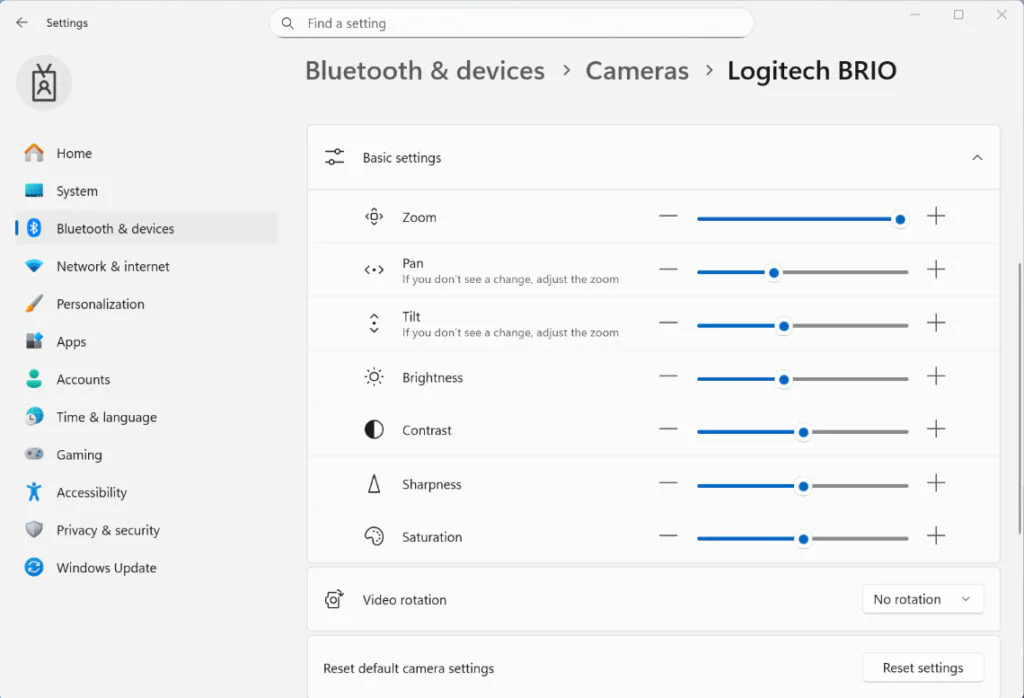
The feature eliminates the need for proprietary OEM software for basic camera positioning on supported devices, integrating the controls directly into the operating system’s native settings interface.
Beyond the feature additions, the build incorporates internal improvements focused on visual stability and performance, according to Microsoft.
Several interface areas have been refined, including the lower edge of the screen when the taskbar is set to autohide. The update resolves reports of desktop icons flashing and reduced performance during desktop interaction. Visual and performance improvements were also made to the Windows Security credential prompt.
Like several recent Beta Channel releases, Build 26220.7755 is rolling out in phases. New additions, including Emoji 16.0 and expanded camera controls, are currently limited to Windows Insiders who have enabled the update toggle under Settings > Windows Update.
Maybe you would like other interesting articles?