
If you use a Xerox printer at home or in the office, finding the right driver can sometimes be a hassle. This is especially true if you manage multiple printers or work with different Xerox models. That’s where the Xerox Global Printer Driver comes in handy.
Instead of installing a separate driver for every supported printer, you can use a single driver package to handle printing across multiple compatible Xerox devices. It’s a practical option for offices, businesses, and anyone who wants to keep their Windows printing setup simple.
In this guide, we’ll cover what the Xerox Global Printer Driver does and how to download and install it.
Table of Contents
- What is the Xerox Global Printer Driver?
- How to Install Xerox Global Printer Driver
- Xerox Global Printer Driver Download
What is the Xerox Global Printer Driver?
The Xerox Global Printer Driver is a printer driver designed to work with multiple supported Xerox printer models. It helps your Windows computer communicate with a compatible printer so you can send documents, photos, spreadsheets, and other files to print.
One of its biggest advantages is convenience. If your workplace has several compatible Xerox printers, you may not need to install a different driver package for each device. Depending on your printer model and the driver version, you can also access various printing options through the Windows print dialog.
Xerox offers different global driver options, including PostScript and PCL versions. The right choice depends on your printer, the applications you use, and the features you need.
How to Install Xerox Global Printer Driver
1. Turn on your Xerox printer and make sure it is connected to the PC where the driver software will be installed.
2. Download the Xerox Global Printer Driver through several links that we provide below this article.
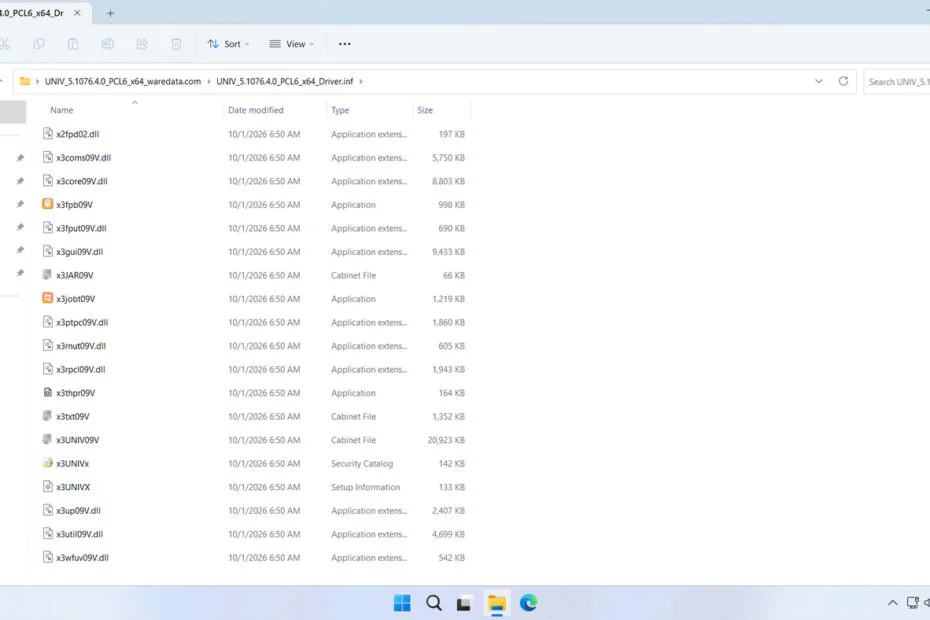
3. Extract the driver file that has been downloaded. To do this, right-click on the file and then select Extract All.
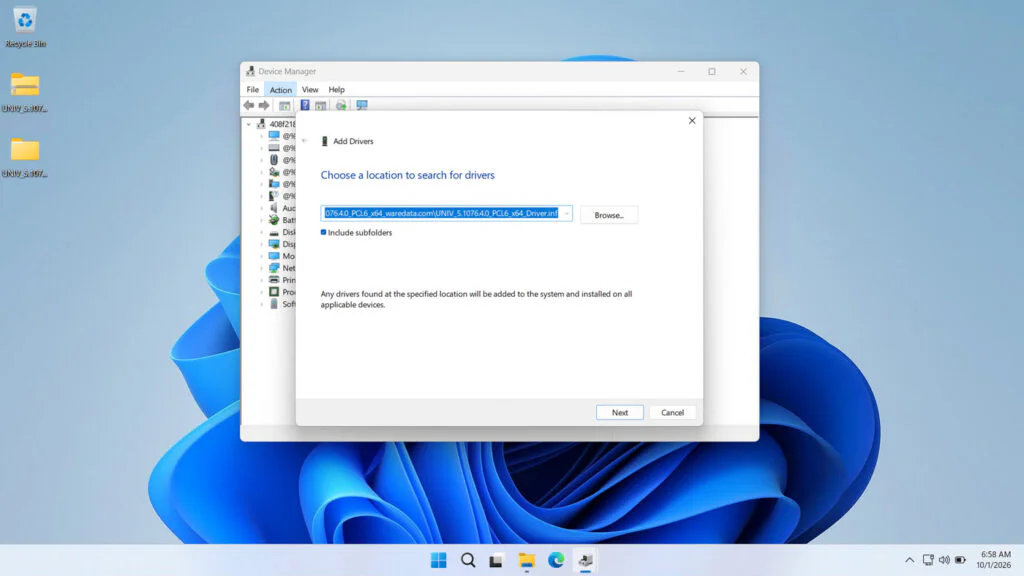
4. Open Device Manager. To do this, type Device Manager in your Windows search, then click Open.
5. Click Action, select Add drivers.
6. Browse the folder extracted from the driver file. Then click Next, and continue until the installation is complete. Look at the screenshot below.
Xerox Global Printer Driver Download
When downloading the driver, you may come across PCL and PostScript versions. Both are printer languages, but they handle printing differently.
1. PCL driver: Often a practical choice for everyday office printing, including documents, forms, and spreadsheets.
2. PostScript driver: Can be useful for graphics-heavy documents and workflows that rely on PostScript support.
Keep in mind that installing a PostScript driver won’t add PostScript capabilities to a printer that doesn’t support them.
To download one of the Xerox Global printer drivers, either the PCL version or the PostScript version, you can download it through the following links.
File Size: 36.4MB
File Type: .ZIP
Maybe you would like other interesting articles?