
The Epson TM-T88V is a popular thermal receipt printer designed for retail stores, restaurants, cafes, and other businesses that need fast and reliable receipt printing. Like any other printer, it needs the right driver and software to communicate properly with your Windows computer.
If you’re setting up an Epson TM-T88V and Windows isn’t detecting it correctly, installing the proper printer driver is usually a good place to start.
Below, we will provide you with a guide on how to install the Epson TM T88V printer driver on the Windows 11 operating system, along with a download link so that you can obtain the driver software.
Table of Contents
- What is the Epson TM T88V Driver?
- How to Install Epson TM T88V Printer Driver
- Epson TM T88V Printer Driver Download
What is the Epson TM T88V Driver?
The Epson TM T88V driver is software that allows your Windows computer to communicate with the TM-T88V thermal printer. It helps Windows understand how to send print jobs to the printer and use its available features.
Depending on your setup, you may also need Epson’s printer configuration or utility software to configure settings such as the paper width, print density, cutter, and communication interface.
How to Install Epson TM T88V Printer Driver
1. Before you start the installation, first make sure that your Epson TM T88V Printer is connected to the Windows operating system.
2. Download the Epson TM T88V printer driver through the link below this article.
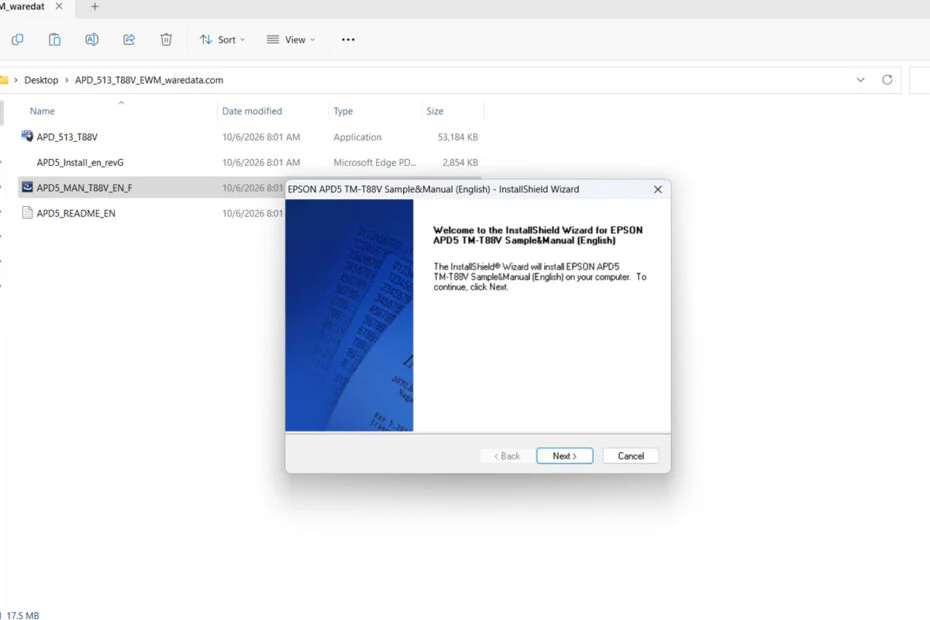
3. Extract the software driver that was downloaded because it is still in an archive file (.zip). The way is by right-clicking and then select Extract All.
4. Open the extracted folder, then run the file named “APD5_MAN_T88V_EN_F.exe“. You just need to double-click this file.
5. Please continue the installation according to the instructions that appear on your computer screen. The installation is quite easy; mostly you just need to click Next and Yes.
6. After the software driver is installed, your Epson TM T88V Printer should be able to be used normally.
Epson TM T88V Printer Driver Download
For Windows users who are looking for the Epson TM T88V printer driver, you can download the driver software for this printer through several links that we provide below.
File Size: 71 MB
File Type: .ZIP
Maybe you would like other interesting articles?