

A lot of longtime Firefox fans weren’t thrilled about the idea of generative AI showing up in their browser. Many of them spoke up, and to its credit, Mozilla paid attention. Now there’s a simple toggle that shuts off every AI feature in one go, and it’s live in Firefox 148.
The “Block AI Enhancements” toggle first appeared in Firefox 148 Nightly in January, introduced after a wave of community backlash. The criticism followed comments from Anthony Enzor-DeMeo outlining plans to bring AI features into the browser. With Firefox 148 now reaching the stable channel, the toggle is available across all release tracks.
In Firefox 148, AI features are turned on by default, but users can switch them off at any time. On desktop, open the hamburger menu in the top-right corner, select Settings, navigate to AI Controls in the left sidebar, and enable “Block AI Enhancements.”
Users can also manage AI tools individually, choosing which features remain active and which stay off. Even with the global kill switch enabled, each AI function can be adjusted through its respective dropdown menu. Any new AI features introduced in the future will automatically remain disabled as long as the AI-blocking toggle is on.
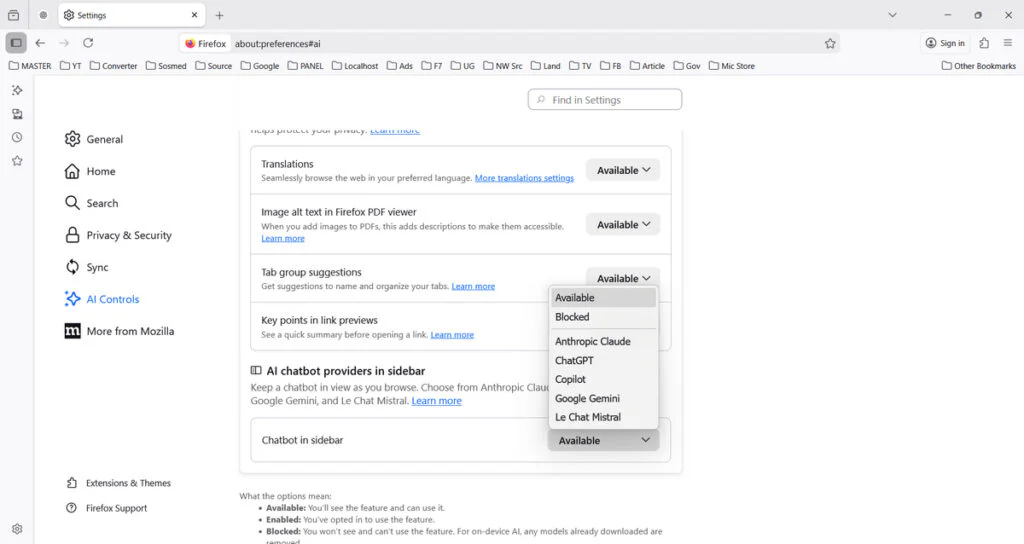
If users decide to turn on the AI chatbot in Firefox, they can choose from five providers: Anthropic’s Claude, OpenAI’s ChatGPT, Google’s Gemini, Mistral AI’s Le Chat, and Microsoft’s Copilot. Additional optional tools include AI-powered translation, automatic alt text for images in PDFs, AI-enhanced tab grouping, and “Key Points” summaries within link previews.
In addition to the AI control, Firefox 148 includes accessibility improvements for screen readers working with math formulas in PDFs. It also enables certain remote updates without requiring telemetry and expands translation support to Traditional Chinese and Vietnamese. Several security fixes and bug corrections are part of the release as well.
Maybe you would like other interesting articles?