
After a long transition period, Samsung has confirmed that its native messaging app will be discontinued in three months. The company has been encouraging Galaxy users to switch to Google Messages for years, and Samsung Messages is now set to end in July 2026.
An End-of-Service notice on Samsung’s U.S. website confirms the change and recommends moving to Google Messages to keep a consistent Android messaging experience. The support page doesn’t include a specific shutdown date, instead instructing users to check the Samsung Messages app for the exact cutoff on their device.
Samsung notes that users running Android 11 or older are unaffected. Following the shutdown, Samsung Messages will function only for emergency numbers or emergency contacts.
The move follows a transition that has unfolded over several years. Samsung gradually set Google Messages as the default texting app on newer Galaxy phones, tablets, and wearables, as both companies worked to expand RCS across Android.
Samsung is highlighting Google’s advantages, such as stronger spam protection, more capable group chats, improved photo and video sharing, typing indicators, multi-device syncing, and Gemini-powered smart replies.
However, Samsung cautions that the transition may cause brief disruptions. Devices released before 2022 could experience temporary interruptions to active RCS chats, though standard SMS and MMS messaging will continue to function.
Older Tizen-based watches released before the Galaxy Watch4 also lack support for Google Messages. As a result, those devices will lose access to full conversation history once Samsung Messages is retired, although basic texting will still be available.
Samsung has already stopped offering the app on the Galaxy S26 and newer devices. Following the July shutdown, other Galaxy users will also lose the ability to download it from the Galaxy Store.
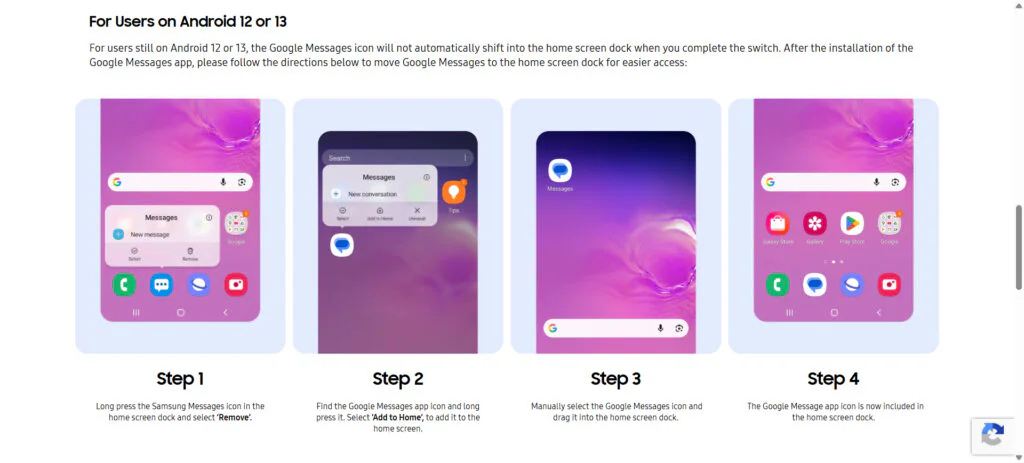
To switch to Google Messages manually, take the following steps:
- Open or download Google Messages. The first time open the app, a message appears: “To use Messages, make it your default SMS app.”
- Tap the ’Set default SMS app’ button.
- Select Google Messages. Google Messages is the white icon with the blue conversation bubble.
- Tap ’Set as default’.
- Google Messages is now default messaging app.
The move is not unexpected, but it still marks the end of an era for longtime Galaxy users. Samsung Messages was widely appreciated for its familiar interface, lightweight design, and tight integration with Samsung’s ecosystem, back when the company maintained its own alternatives to many Google services.
Maybe you would like other interesting articles?