
If you use a ZP 505 printer for printing labels, shipping information, or other business documents, having the right printer driver can make a big difference. Without a correct printer driver, your computer might not recognize the printer, or you may run into annoying printing problems.
The good news is that setting up a ZP 505 printer doesn’t have to be complicated. In this guide, we’ll cover how to find the right ZP 505 printer driver and install it on Windows 11.
Table of Contents
- What is ZP 505 Printer Driver?
- How to Install ZP 505 Printer Driver on Windows
- ZP 505 Printer Driver Download
What is ZP 505 Printer Driver?
A ZP 505 printer driver is software that allows your computer to communicate with your printer. Without driver software, applications in Windows will not be able to detect the presence of your printer, so you will not be able to use the printer.
In addition, driver software is also very important in helping to handle problems if, in the future, the printer experiences issues such as errors and so on; driver software often issues warnings along with their solutions.
How to Install ZP 505 Printer Driver on Windows
1. Before you install the ZP 505 printer driver, it is important to make sure that the printer is connected to the computer and turned on.
2. After that, you can download the ZP 505 printer driver for Windows through several links that we provide below this article.
3. After downloading the driver software, please extract it first by right-clicking and then selecting Extract All.
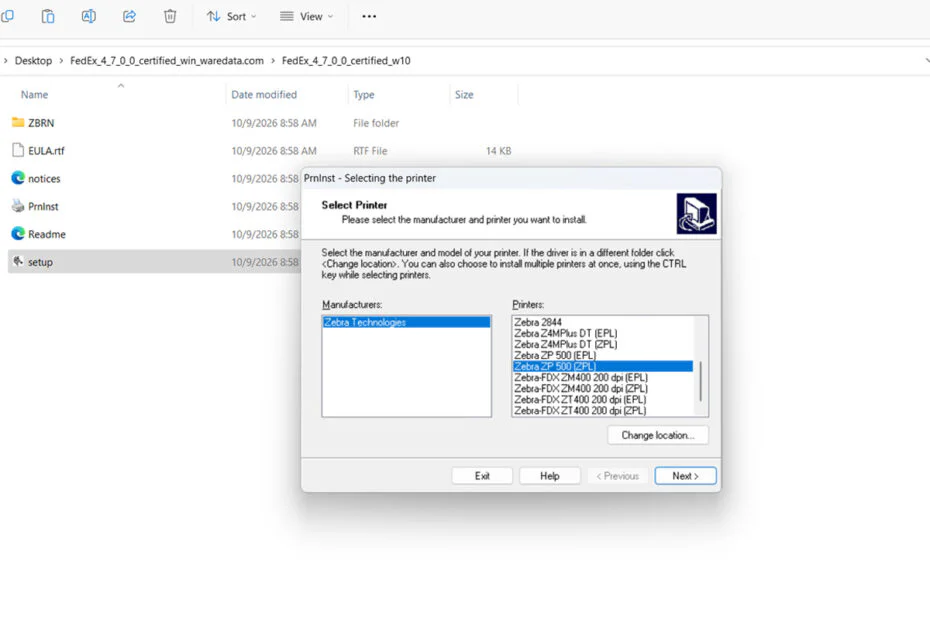
4. Open the extracted folder, then run the file named “setup.exe” by double-clicking on the file.
5. Click the Install Zebra Printer button.
6. Select the Zebra ZP 500 series, then click Next.
7. Select your printer’s port location; the port will be detected if you have connected the printer to the computer.
8. Complete the driver software installation.
9. After that, your ZP 505 printer will be able to be used as usual.
ZP 505 Printer Driver Download
For Windows operating system users who need the ZP 505 printer driver, you can download the driver software through the following links.
File Size: 10.8MB
File Type: .ZIP
Maybe you would like other interesting articles?