
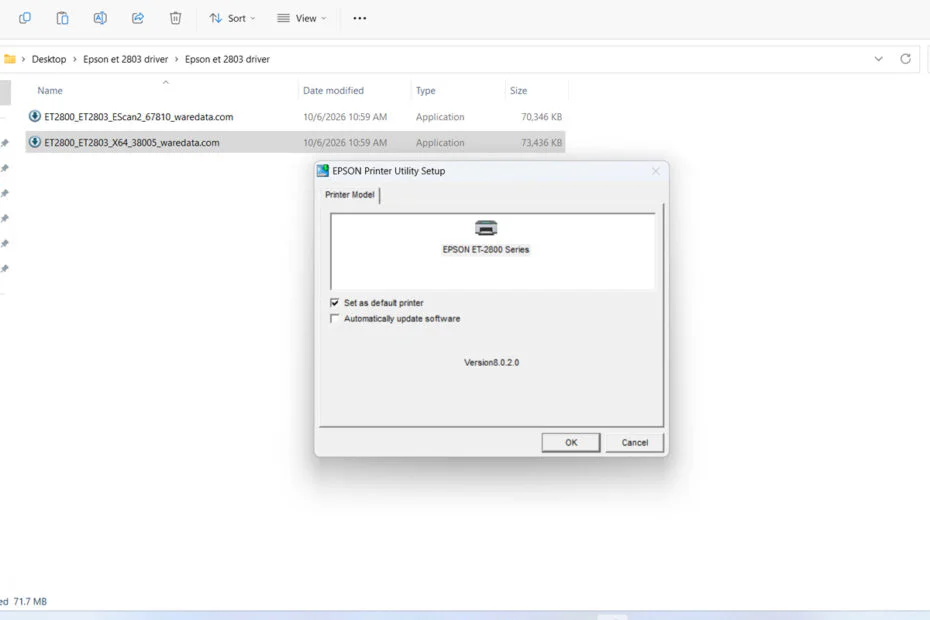
If you own an Epson EcoTank ET 2803, having the right printer driver installed is important to keep everything working smoothly. The driver allows your Windows computer to communicate with the printer, so you can print documents, photos, and other files.
If your Epson ET-2803 isn’t being detected, prints aren’t coming out correctly, or some printer features aren’t available, reinstalling the driver can often help.
Below, we will provide the download link for the Epson ET 2803 printer driver, along with a guide on how to install it on Windows 11.
Table of Contents
- What is Epson ET 2803 Printer Driver?
- How to Install Epson ET 2803 Printer Driver
- Epson ET 2803 Printer Driver Download
What is Epson ET 2803 Printer Driver?
The Epson ET 2803 printer driver is software that allows your computer to communicate with the printer. Windows uses the driver to understand what the printer can do and how it should handle each print job.
Without a correct driver, Windows may not recognize the ET-2803 correctly. You might also see problems such as missing print options, poor print quality, or a printer that appears offline.
How to Install Epson ET 2803 Printer Driver
1. Before you install the Epson ET 2803 printer driver, it is important to make sure that your printer is turned on and connected to the computer, either using a cable or using WiFi.
2. Then you can download the Epson ET 2803 printer driver through several links below this article.
3. After the driver software is downloaded, please extract the file first, because it is still in .zip format. The way to do it is by right-clicking, then selecting Extract All.
4. Inside, there is driver software for the printer and scanner; please double-click to start the installation, and do it one by one.
5. Follow the installation instructions that appear on the computer screen until the installation is complete.
6. After the driver software installation is complete, it is highly recommended to restart your computer, and after that, you can use the printer as usual.
Epson ET 2803 Printer Driver Download
For Windows operating system users who are looking for the Epson ET 2803 printer driver, you can download the driver software through the following links.
File Size: 138 MB
File Type: .ZIP
Maybe you would like other interesting articles?