
If you use a Canon laser printer, you may have come across something called the Canon UFR II printer driver. This driver is commonly used with Canon imageCLASS and imageRUNNER printers, helping your computer communicate with the printer and process documents correctly.
Whether you’re setting up a new printer or fixing a printing problem, installing the right driver is an important step. Here’s what you need to know about Canon UFR II, where to download it, and how to install it on your Windows PC.
Table of Contents
- What is Canon UFR II Printer Driver?
- How to Install Canon UFR II Printer Driver
- Canon UFR II Printer Driver Download
What is Canon UFR II Printer Driver?
UFR II stands for Ultra Fast Rendering II, a Canon-developed printing technology designed to process print jobs efficiently.
Instead of relying entirely on your computer to handle every part of the printing process, UFR II uses a combination of the printer driver and the computer’s processing power to prepare documents for printing.
The driver helps Windows applications send text, images, PDFs, and other documents to a compatible Canon printer.
How to Install Canon UFR II Printer Driver
1. Before starting the installation of the Canon UFR II printer driver, make sure your printer is turned on and connected to the computer.
2. Download the Canon UFR II printer driver through several links below this article.
3. After that, double-click on the downloaded driver software to perform the extraction.
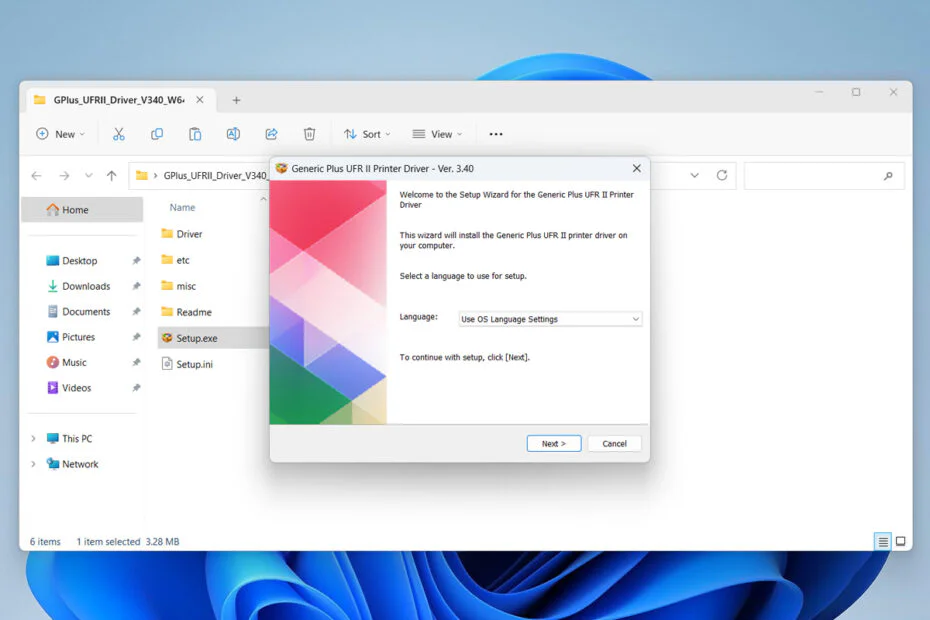
4. After that, open the extracted folder, then run the Setup.exe file by double-clicking it.
5. Perform the installation according to the instructions that appear on your computer screen until the installation is complete.
6. After the installation is complete, the printer should be able to be used normally, and if you encounter any problems, you can try restarting the computer first before using the printer.
Canon UFR II Printer Driver Download
If you are a Canon printer user and need the Canon UFR II Printer Driver, you can download the driver software through the following links.
Maybe you would like other interesting articles?