
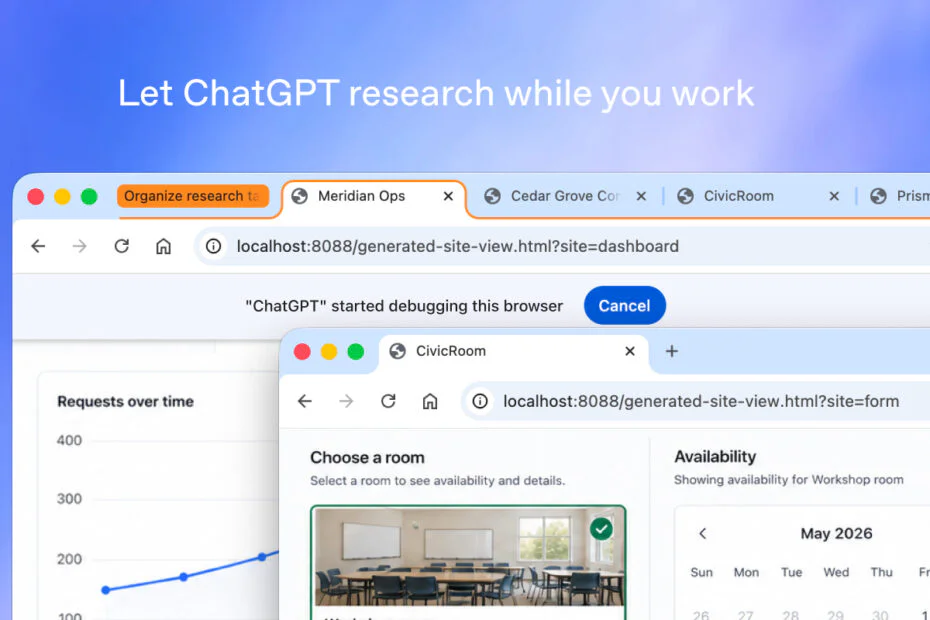
OpenAI has rolled out a significant update to its ChatGPT browser extension, deepening its ties to Google Chrome. The AI can now read open webpages, analyze what’s on them, and carry out tasks inside the browser. The update also adds voice features and support for more languages.
The ChatGPT Chrome extension was first given access to content in open tabs last July. The newest version adds two modes, Chat and Work, which let ChatGPT interact with browser tabs and handle a wide range of tasks. Among them is filling out online forms using information pulled from documents saved on the user’s device.
In Chat mode, ChatGPT can read the content of open tabs, analyze it, and answer questions based on the page the user is viewing. OpenAI points to shopping as one use case: comparing prices, delivery times, return policies, and other details for the same product across different retail sites.
In Work mode, ChatGPT can take control of the browser to send messages, download files, and sort open tabs into groups by topic. It can also fill out forms using details it finds online or pulls from files on the user’s computer. Once a form is filled in, the user can look it over before submitting it.
A new @Chrome tag lets users trigger browser tasks straight from the ChatGPT app or website, no side panel required. OpenAI has also added tab-level restrictions, so ChatGPT can be scoped to chosen tabs and kept away from everything else that’s open.
Another new feature is a dedicated ChatGPT tab in Chrome that contains the user’s chat history. Users can ask questions in Chat mode or complete tasks in Work mode from this tab. ChatGPT asks for permission when it accesses chat history or visits a new website. Users can allow once, allow for the site, allow for all sites, or decline.
The new features are free to use in several Chromium-based browsers, including Chrome, Edge, Brave, Opera, and Vivaldi. Firefox and Safari users will have to wait, as the tools aren’t available there right away. The updated extension can be downloaded from the Chrome Web Store.
OpenAI first brought ChatGPT to Chrome last July, giving users a set of AI features through the extension’s Side Chat panel. That release let ChatGPT summarize articles, break down complicated material in plain English, answer questions about YouTube videos, and translate text from a wide range of languages.
OpenAI is still improving ChatGPT’s support for third-party browsers, but its own browser, Atlas, is gone. Launched last year with ChatGPT built in, Atlas was retired in August after it failed to win meaningful market share from established rivals such as Chrome, Safari, Edge, and Firefox.
Maybe you would like other interesting articles?