

Netflix has added Google Chrome to its list of browsers that can stream content in 4K resolution. The feature was first spotted during testing last month and is now confirmed in Netflix’s updated support documentation. However, 4K playback comes with several hardware and software requirements that could prevent many subscribers from using it.
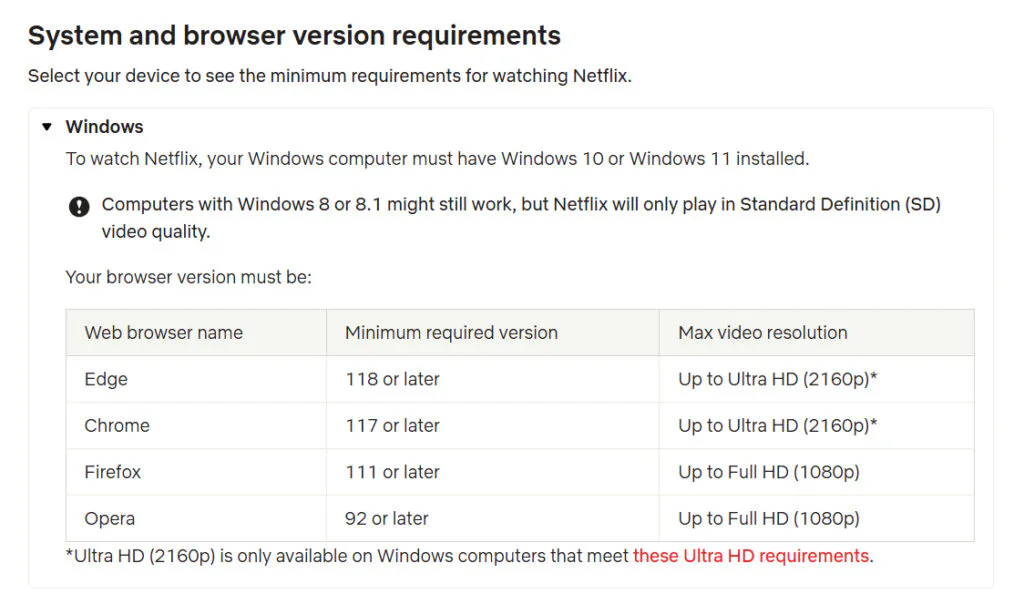
Previously, Netflix offered 2160p streaming on computers through Microsoft Edge, while Mac users needed Safari. The company now lists Chrome 117 or newer as a supported browser for Ultra HD playback. However, Chrome’s 4K support is limited to Windows PCs and Chromebooks. Mac users will still need Safari or Microsoft Edge for macOS if they want the highest available resolution.
A Premium subscription is required for Netflix’s 4K content. In the U.S., the plan currently costs $27 per month. Without a Premium membership, even users with compatible hardware will be limited to lower resolutions.
Netflix has several additional requirements for 4K streaming. A stable internet connection with download speeds of at least 15 Mbps is required, along with Windows 11 and the latest system updates. The graphics card must be an Nvidia GeForce GTX 1050 or newer or an AMD Radeon RX 400 series or newer. Netflix also requires at least a 7th-generation Intel Core processor or an AMD Ryzen CPU.
The display must also meet Netflix’s technical requirements. A built-in screen, external monitor, or TV needs to support 4K at 60Hz and HDCP 2.2. If multiple displays are connected, each one must meet these requirements for 4K playback to function.
The same hardware requirements will likely apply to Netflix’s Windows app, which means Windows 10 users still won’t have an official way to watch in 4K. Chrome gives more people access to Ultra HD streaming, but Firefox and Brave users are still left out.
Getting the best picture quality on a PC is becoming more complicated as streaming services tighten their hardware and DRM requirements. To watch in the highest resolution, users increasingly need an up-to-date system that meets all of the platform’s compatibility rules. Ultra HD Blu-ray offers much higher bitrates than streaming, but playing those discs on Windows 10 can be a hassle, often requiring compatible drives, firmware changes, and DRM workarounds. It can be done, but the process is anything but convenient.
Maybe you would like other interesting articles?