

Several months after introducing the feature, Microsoft is expanding Xbox mode to all Windows 11 devices. Early benchmarks show modest improvements in memory efficiency and frame rates. The company has released Windows 11 Canary Build 29570.1000 through the Windows Insider Program. While the update is limited in scope, it includes Xbox mode for Insider testers to try.
First announced in 2025, Xbox mode offers a full-screen interface built to put gaming first. Inspired by the console experience, the feature lets users boot directly into a dedicated gaming environment, reducing background activity and potentially improving performance.
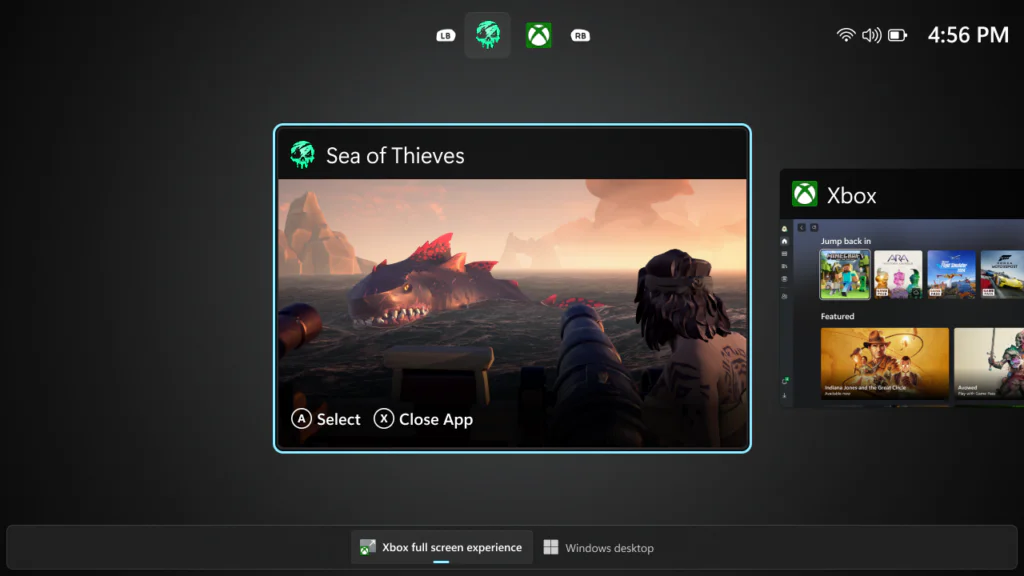
“Xbox mode is designed for those moments when you want to lean back, pick up a controller, and focus on the game,” Microsoft said.
Xbox mode can be used as the default Windows interface or launched from the system’s main desktop environment. Microsoft provided instructions when it first introduced the feature, while MSI published a guide for enabling and using Xbox mode on its Claw handheld gaming devices.
MSI also confirmed potential performance improvements from the new gaming-focused full-screen interface. The Taiwanese manufacturer said in 2025 that the GUI could reduce Windows 11 RAM usage by around 10%. It also reported frame rate increases in Cyberpunk 2077 of 6.3% on the Claw A8 at FHD+ and 8.9% on the Claw A1M at FHD.
Although a minor frame rate gain may not satisfy desktop users seeking larger improvements, it could be meaningful for power-constrained devices such as Windows-based gaming handhelds. It is still uncertain how the latest version of Xbox mode compares with previous benchmark results.
Alongside the full-screen Xbox mode for gaming tasks, the new Windows 11 Canary Build expands the number of pre-installed Microsoft apps (MSIX/APPX) that can be removed in enterprise and educational environments. Other updates include changes to File Explorer’s context menu, touchpad settings, lock screen widgets, and additional options.
Maybe you would like other interesting articles?